

Mastering N8N: The Trendiest and hottest topic of automation!
Imagine a platform that connects 400+ applications, deploy autonomous AI agents, and run millions of workflow executions; everything at a minimal price of $20 per month.
Now, that’s n8n, and the market has already noticed it.
N8n, pronounced “nodemation”, boasts 182,400 + GitHub stars, placing it as one of the most renowned projects on all of GitHub. Its user base has crossed over 230,000 global users as of late 2025 Flowlyn. The data contains only the tracked instances. The platform has experienced 6 times year-over-year user growth.
However, to know more information on this exciting platform and enhance your career growth in this field, n8n Online Training is very beneficial.
Why n8n interview matters the most in 2026:
In series C funding, n8n raised around $180 million at a $2.5 billion valuation in a short period of time, around 4 months. As per the data by Scara, the business reached $40 million of recurring revenue serving renowned customers like Microsoft and Vodafone.
This clearly reveals the immense potential n8n has in the coming years.
The radical cost efficiency of around 80% to 90% for high-volume users makes it a great choice. GROWAI shows the data that says the company has exploded the job market, as well as providing more than 1L salary to entry-level candidates. In 2026, more than 455 jobs were listed on Glassdoor, providing candidates with an opportunity to establish a career with huge growth.
MatechCO,
If you’re interviewing for roles involving n8n, automation engineering, or AI orchestration — this guide is your unfair advantage. Let’s dive in.
Section 1:Core n8n (Questions for Beginners)
Q1: Why is n8n gaining huge traction?
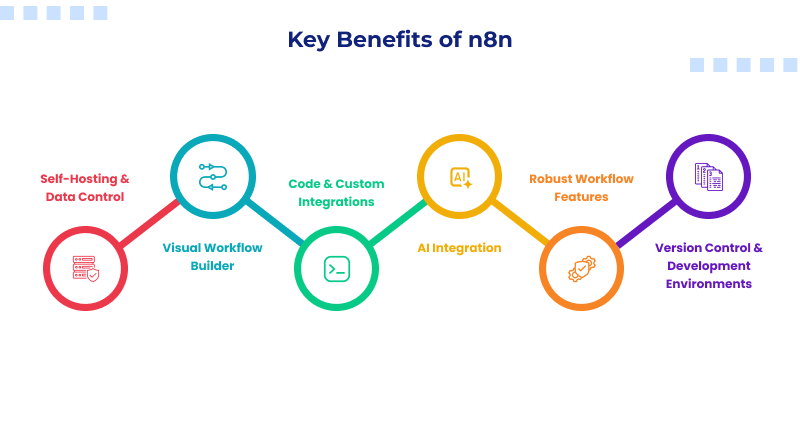
n8n is a powerful and fair code workflow automation tool that connects databases, different applications, AI agents, and APIs using a visual interface. It builds on Node.js.
Things that make it unique from Zapier are self-storage capability, no vendor lock-in feature, fair code licensing, and AI native architecture.
Explore the n8n tutorial for more information.
Q2: What are the core building blocks of an n8n workflow?
Nodes and connections are the core components powering every workflow. Generally, you can initialise a workflow with a trigger node and chain one or more action nodes. Here, each node is used to do specific tasks like collecting data, transforming, along with analyzing using AI and sending.
Q3: Can you answer the different categories of n8n Nodes?
- Trigger Nodes (Used to start workflows)
- Action Nodes (Interact with apps and perform operations)
- Core nodes (Logic and flow control)
- Data transformation nodes (Used to manipulate data)
- AI nodes (LangChain components)
- Utility notes (Organize canvas and documenting workflows)
Q 4: How will you set up n8n in production using Docker?
You need to shift it from a working mindset to one focused on security, reliability, and automation.
version: “3.8”
services:
n8n:
image: docker.n8n.io/n8nio/n8n:latest
restart: always
ports:
– “5678:5678”
environment:
– N8N_ENCRYPTION_KEY=your-strong-random-key-here
– N8N_BASIC_AUTH_ACTIVE=true
– N8N_BASIC_AUTH_USER=admin
– N8N_BASIC_AUTH_PASSWORD=${N8N_PASSWORD}
– DB_TYPE=postgresdb
– DB_POSTGRESDB_HOST=postgres
– DB_POSTGRESDB_DATABASE=n8n
– DB_POSTGRESDB_USER=n8n_user
– DB_POSTGRESDB_PASSWORD=${DB_PASSWORD}
– WEBHOOK_URL=https://automation.yourdomain.com/
– N8N_LOG_LEVEL=info
volumes:
– n8n_data:/home/node/.n8n
depends_on:
– postgres
postgres:
image: postgres:16-alpine
restart: always
environment:
– POSTGRES_DB=n8n
– POSTGRES_USER=n8n_user
– POSTGRES_PASSWORD=${DB_PASSWORD}
volumes:
– postgres_data:/var/lib/postgresql/data
healthcheck:
test: [“CMD-SHELL”, “pg_isready -U n8n_user -d n8n”]
interval: 10s
timeout: 5s
retries: 5
volumes:
n8n_data:
postgres_data:
Tip from expert: If you lose N8N_ENCRYPTION_KEY, it directly means you will lose access to the stored data. So, be sure you save it explicitly.
Q5. What is the difference between pinned data and live data?
- Live data — generated dynamically during each workflow execution; changes every run
- Pinned data — static JSON manually attached to a node’s output for testing purposes
Pinned data lets you develop and debug downstream logic without repeatedly triggering upstream APIs. It’s essentially mocking for workflow automation.
Q6: How does n8n manage credentials?
n8n manages credentials centrally using API keys along with authentication details. A defined schema is followed by each credential type.
Points you need to remember to impress the interviewer are:
- Encryption key is controlled via N8N_ENCRYPTION_KEY env variable
- Credential sharing across workflows is supported in team/enterprise setups
- OAuth2 refresh tokens are handled automatically by n8n
- Never export credentials in workflow JSON — they are excluded by default
Section 2: Intermediate n8n Interview Questions
Q7. How will you handle errors and retries in n8n?
Typically, n8n offers three layers of error handling:
- Node-level retries – this layer configures retry count, wait time, and backoff strategy per node
- Continue On Fail – it allows the workflow to proceed even when a node errors; the error object is available as {{ $json.error }}
- Error Trigger Workflow – this is a global catch-all workflow that fires whenever any workflow fails
Q8. Do you know about the Merge Node and what key join modes it supports?
As the name says, merge combines data from two separate branches. Check out the modes here.
- Append — concatenates all items from both inputs into one stream
- Keep Key Matches — inner join; only keeps items where a specified field matches in both inputs
- Enrich — left join; keeps all Input 1 items and attaches matching Input 2 data
- Combine — cartesian product (every item × every item) or positional match (item 1 with item 1)
- Choose Branch — selects one input and discards the other based on logic
Q9. Do you know the pagination strategy when calling external APIs?
n8n uses a specific strategy that the API provider uses. Most APIs implement one of the three common patterns like:
- Offset-based — increment an offset parameter on each page
- Cursor-based — pass a cursor/token from the previous response
- Link Header — follow the next URL from the response headers
For custom APIs, use a loop pattern:
Javascript
// Code Node: Manual cursor-based pagination
let allResults = [];
let cursor = null;
let hasMore = true;
while (hasMore) {
const url = `https://api.example.com/records?limit=100${cursor ? `&cursor=${cursor}` : ”}`;
const response = await fetch(url, {
headers: { ‘Authorization’: ‘Bearer ‘ + $(‘Set Credentials’).item.json.token }
});
const data = await response.json();
allResults = allResults.concat(data.records);
cursor = data.nextCursor;
hasMore = !!cursor;
}
return allResults.map(record => ({ json: record }));
Q10. Why are sub-workflows important?
Subworkflows allow an individual to call one workflow from another. Think of them as reusable functions.
Best use cases:
- Shared utilities — a standardized error-notification pipeline used by 20+ workflows
- Separation of concerns — break a 50-node mega-workflow into manageable modules
- Security isolation — grant different credential access to different sub-workflows
- Testing — unit-test individual sub-workflows independently
You need to pass the data in parameters while you get the results to the calling workflow.
Section 3: n8n Interview Questions (Advanced level)
Q11. How will you be able to secure webhooks during n8n deployments?
In order to secure webhooks, you need multi-layered approach namely,
- Authentication – this enables Basic Auth, Header Auth, or JWT validation on the Webhook node
- HMAC Signature Verification – this layer validates that requests actually originate from the expected sender
- IP Allowlisting – the step involves restricting incoming webhook traffic.
- Rate Limiting – this is about implementing rate limits
Here’s an HMAC verification example for GitHub webhooks:
javascript
// Code Node: Validate GitHub webhook signature
const crypto = require(‘crypto’);
const secret = $(‘Get Credentials’).item.json.webhookSecret;
const signature = $input.first().headers[‘x-hub-signature-256’];
const payload = JSON.stringify($input.first().json);
const expectedSignature = ‘sha256=’ +
crypto.createHmac(‘sha256’, secret)
.update(payload, ‘utf8’)
.digest(‘hex’);
if (!crypto.timingSafeEqual(
Buffer.from(signature),
Buffer.from(expectedSignature)
)) {
throw new Error(‘Webhook signature verification failed — request rejected’);
}
// Signature valid — proceed
return $input.all();
Note: Always use crypto.timingSafeEqual() instead of === to prevent timing attacks.
Q12. How will you build an AI Agent workflow in n8n?
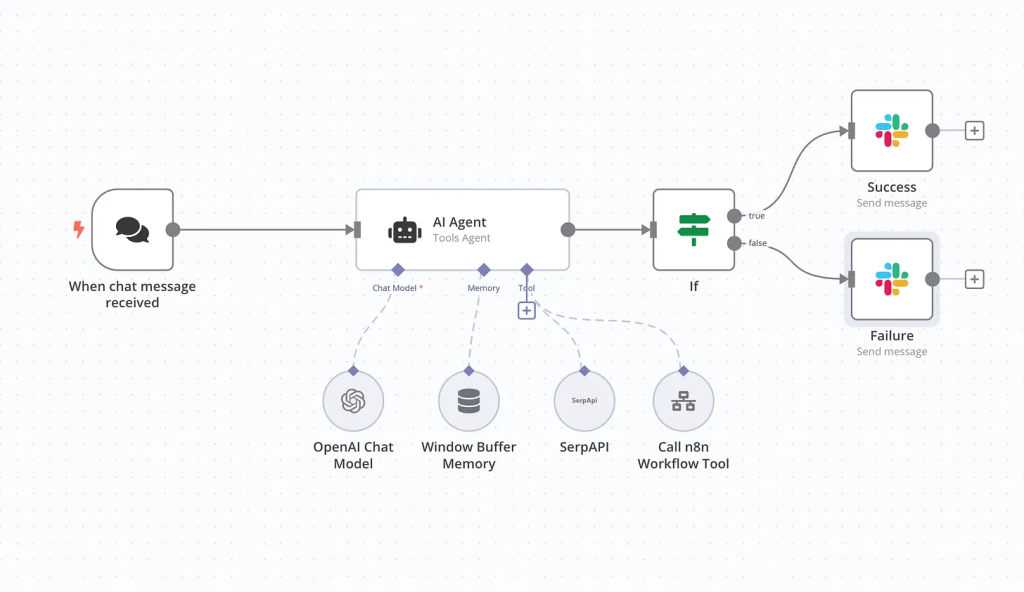
You can build the n8n’s AI stack on LangChain that also supports autonomous agents that reason, use tools, and maintain memory. Key components are:
- AI Agent Node – this connects to any LLM like OpenAI, Claude, Gemini, Ollama for local models)
- Tool Nodes – it give the agent capabilities like searching databases, sending emails, or calling APIs
- Memory Nodes – these maintain conversation context across turns (Window Buffer or Postgres-backed)
- Output Parser – this typically structures the agent’s final response into usable JSON
Section 4: Case study n8n Interview Questions based (scenario-based)
Q13: Will you be able to build a workflow that syncs CRM contacts to a marketing platform every night?
Architecture:
Trigger: Scheduled daily timer (2 AM local daily)
- HTTP Request — pull contacts from CRM API with cursor pagination
- Code Node — field mapping, deduplication by email, data enrichment
- Split In Batches — process 100 records at a time to respect API rate limits
- HTTP Request — upsert to marketing platform
- IF Node — check for errors on each batch
- Error branch → log failed records to Google Sheets + alert on Slack
Q14: Can you create a RAG (Retrieval-Augmented Generation) chatbot with n8n?
Yes. Answer the question with the workflow written below:
Webhook (chat input)
→ Code Node (sanitize & format query)
→ Embeddings Node (OpenAI or local)
→ Vector Store Retriever (Pinecone / Qdrant / Postgres pgvector)
→ AI Agent Node (LLM with retrieved context as system prompt)
→ Respond to Webhook (return answer)
Key details to mention:
- Chunking strategy — split documents into 500-token overlapping chunks during ingestion
- Embedding model — text-embedding-3-small for cost efficiency
- Top-K retrieval — retrieve 3-5 most relevant chunks
- Memory — use Window Buffer Memory to maintain conversation context
Section 5: Speed Quiz Questions
- Q15. What is $execution.resumeUrl? – A URL that, when called, resumes a paused workflow (used with the Wait node for human-in-the-loop approvals).
- Q16. Can n8n run on ARM? – Yes.
- Q17. How do you debug failing workflows? – Manual execution mode, inspect node I/O at each step, pin test data for isolation, and check execution logs in the UI or database.
- Q18: Do you know what fair code is? – It is a software model where source code is freely available, but offering n8n requires a managed service. It is not a traditionally open source service.
Final Thoughts – How to Stand Out in Your n8n Interview
The n8n ecosystem is evolving at breakneck speed. With its $2.5 billion valuation, 182K+ GitHub stars, and AI-native architecture, it’s no longer a niche tool – it’s becoming essential infrastructure for modern engineering teams.
Three tips to separate yourself from other candidates:
- Build something real. Do something good like design a workflow you can demo live.
- Know the AI stack. n8n’s LangChain integration, AI Agent nodes, and RAG capabilities are the fastest-growing areas. If you can explain and build an agent workflow, you’re ahead of 90% of candidates.
- Understand production ops. Queue mode, Redis scaling, Prometheus monitoring, and CI/CD pipeline for workflows – these are what separate a hobbyist from someone who can run n8n at enterprise scale.
Good luck. You’ve got this.
